How to create a 3D render
What is a 3D render?
Before creating a 3D render, you have to understand what a 3D render is. The process of displaying 3D objects on a 2D screen is called 3D rendering. Think of it as taking a picture, the camera is rendering the 3D object you take a picture of onto a 2D screen. By definition of the Oxford Learner's Dictionary, 3D is "having, or appearing to have, length, width and depth". By that definition, a 3D space could theoretically consist of a simple list of 3 values representing X, Y, and Z.
Terminology
Another thing that is just as important to know is the terminology used in 3D rendering.
- Vertex (Plural: Vertices) - A point where two or more lines/edges meet, in a Cube it would be the corners.
- Edge (Plural: Edges) - A line between two vertices.
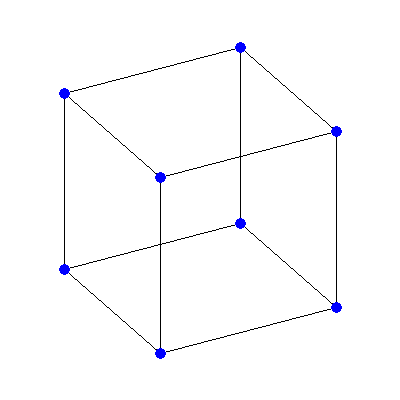
Blue circles are vertices, black lines are edges.
- FPS (Frames Per Second) - The amount of frames displayed every second. Think of it like a flip book where every page would be a frame, the amount of pages that gets flipped every second would be the frames per second.
- Painter's algorithm - A simple visual surface determination method in which a 3D object is rendered like a painting, rendering far away first and then coming toward the camera.
- Rasterization - The process of taking a vector image and displaying it on the screen as pixels.
- Interpolation - Estimate a value that falls between two values, used for gradients.
- Cross Product - Calculates the area of polygon.
Creating a 3D render
Now we can move on to actually creating a simple 3D render. Like stated above, a 3D space could theoretically consist of a simple list of 3 values representing X, Y, and Z.
Vertex = [1, 5, 7] # This could theoretically be a 3D space since it consists of X, Y, and Z.
Frames Per Second
Frames Per Second (FPS) is the amound of Frames rendered and displayed every second. The key to calculating FPS is:
Delta Time = Current Time - Start Time
FPS = 1/Delta Time
Start Time = Current Time
If you put that in a loop, the FPS gets calculated accurately every frame.